Nobody had time for it,
until it blocked a launch

Context
I had 2.5 weeks to ship an entire premium tier at Modak - new visual identity, tier-based theming, branded components.
I'd been pushing to prioritize the design system for months, but design infrastructure rarely wins the roadmap fight at a startup.
When engineering asked where the design system was, the honest answer was: we had one in Figma and one in tech, but it was a mess of duplicated components, inconsistent naming, and no variable architecture. Suddenly the thing nobody had time for became the thing blocking a launch.
Why we started from zero
My first instinct was to patch what we had. But the existing system had a deeper problem: it wasn't just messy for humans - it was unreadable for AI. We'd heard from designers at larger companies that integrating AI into existing, mature design systems consistently failed. The system was too tangled, too full of legacy decisions and unnamed variants, for a code agent to parse reliably.
So we made the call
Together with the frontend engineers, Matias Torsello, Pablo Porzio and Lucio Trucco, who'd later form the implementation pod, to rebuild from zero. Not because starting over is inherently better, but because clean architecture was a prerequisite for the AI-assisted workflow we wanted to test.

What I actually built
I created the full color variable architecture in Figma - primitives, semantic tokens, and component-level tokens with tier-based variants (Modak Free vs. MoGold). This structure was designed from the start to scale to future tiers without too much additional UI work.
Modak Free

👑 MoGold

But the components and variables alone weren't enough. When our frontend engineers first connected Claude to Figma through MCP and pointed it at the component library, the output was poor.
Claude could see the components. It just didn't understand them.
When to use one variant over another, what the constraints were, how they differed across tiers. Claude just didn’t know. The real bottleneck... was the documentation.
I spent two days writing detailed specs for 20+ components: descriptions, property breakdowns, do's and don'ts, and visual references showing how each component looks in Free vs. MoGold. This documentation wasn't written for designers or for engineers. It was written for Claude. It became the context layer that made the entire AI workflow functional.

We tested 3 hypotheses
With the new system and documentation in place, we explored three ways AI could accelerate our workflow:
✅ Phase 1: Component implementation → it worked
Humans decide, AI executes
With the documentation in place, component generation worked well.
The code agent builds the components.
The developer reviews.
Components went into a Storybook catalog that the team (and Claude itself) uses today.
Everyone does what they're best at and we have 1 source of truth (finally).

❌ Phase 2: Claude designing screens → didn’t work
Not yet, but the groundwork is laid
Could Claude go further - designing full screens in Figma using our components?
We tried both Figma MCP and Claude Design.
Results were visually decent but impractical: too slow per screen, not faithful enough to our design rules to save meaningful time.
The technology isn't there yet for screen-level generation, but the groundwork is laid for when it is.
🙋♀️
Designer/PM/PO
Brief a design to agent

Code agent
Reads brief and use the Design System to design in Figma
🙋♀️
Designer
Reviews final design
✅ Phase 3: Screen implementation → it worked
Design it once, implement it right
Once a screen is designed using Orion components, engineers pass it to Claude and it implements the full screen at high quality.
It recognizes the components and reads the tokens.
It even flags when something doesn't exist yet: do you want to create it as a new catalog entry or a one-off instance?

This project didn't just produce a design system. It created a shared language.
Before, what I called a "cell" in Figma, engineering called a "feature box". That naming mismatch alone made AI-assisted development impossible - if Claude didn't know that a cell and a feature box were the same thing, it couldn't help build screens consistently.

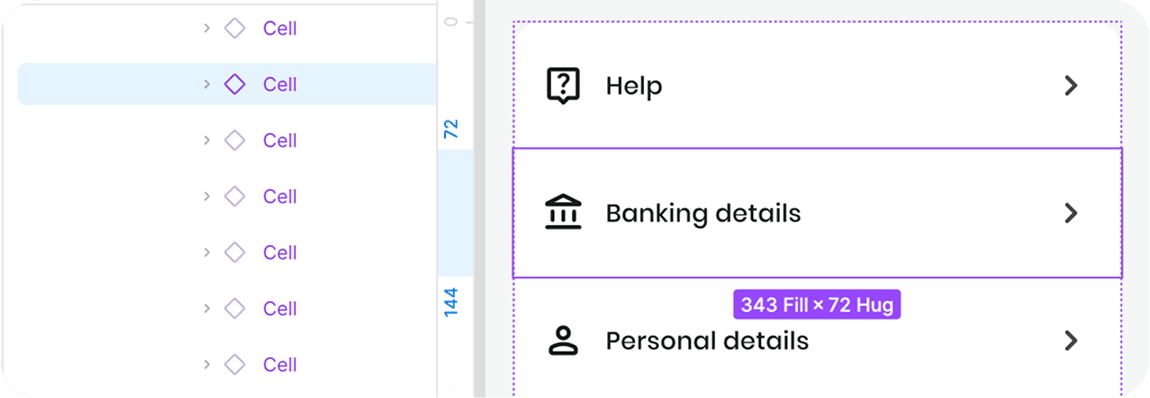



Now, when a screen is designed using Orion components, engineers pass it to Claude through MCP and Claude can implement the full screen at high quality. It recognizes the components because they exist in the Storybook catalog with the same names and tokens used in Figma.
Not perfect, but wow.
Results
Everyone - designer, engineers, and AI - speaks the same language. Development is faster, visual inconsistencies are fewer, and my role shifted from policing implementation ("this doesn't look like the design") to defining the system that makes correct implementation the default.
